- Home Page /
- Electronics /
- Computer Accessories /
- Computer Accessories & Peripherals /
- Input Devices /
- Graphics Tablets /
- XPPen 4K UHD Artist Pro 19 Gen2 Drawing Table...
0 ratings
- View site in :
- Português





XPPen Artist 22 2nd pen tablet lets you draw with more precise cursor positioning, even at the four corners.

Item #:
53288356
XPPen 4K UHD Artist Pro 19 Gen2 Drawing Tablet with Screen, 156% sRGB Graphic Tablet with 1.07 Billion Colors Anti-Glare Drawing Monitor with Dual
90% of respondents would recommend this to a friend
Item #:
53288356
€ 813
Price Details
Excluding Shipping & Custom charges ( Shipping and custom charges will be calculated on checkout )
*All items will import from US
20%
In stock
 Imported from USA store
QTY:
Order now and get it around Tuesday, June 30
Secured transaction
Ubuy works hard to protect your security and privacy. Our advanced payment security system ensures confidentiality by encrypting your information during transmission using AES (Advanced Encryption Standards) and SSL (Secure Socket Layer) protocols. Your payment details are 100% secure as we do not share your payment details with third party sellers.
Our Top Logistics Partners


XPPen Artist 22 2nd pen tablet lets you draw with more precise cursor positioning, even at the four corners.

Fast
Shipping

Free
Return*

Secure Packaging

100% Original Products

PCI DSS Compliance

ISO 27001 Certified


Note: Step Down Voltage Transformer required for using electronics products of US store (110-120). Recommended power converters Buy Now.


What Stands Out
4K UHD Display
Experience stunning visuals with 4K UHD resolution, offering crystal-clear detail and vibrant colors for a truly immersive drawing experience.
High Color Accuracy
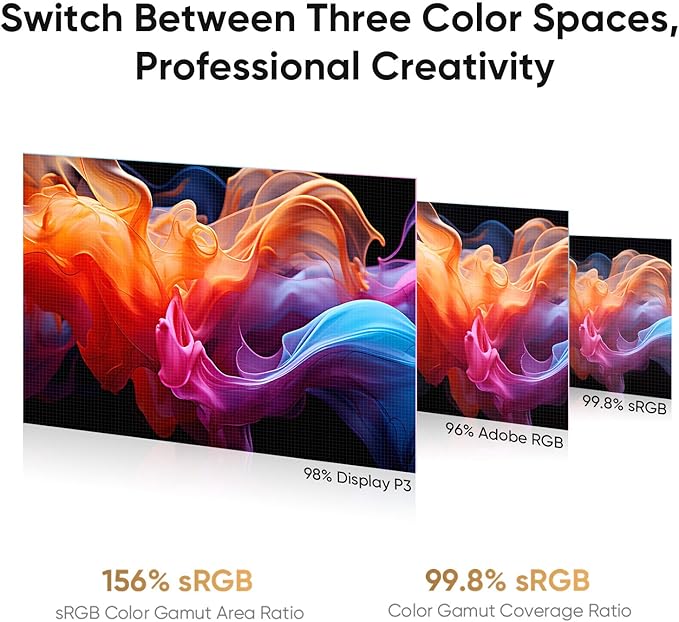
With 156% sRGB coverage and 1.07 billion colors, the tablet ensures accurate color reproduction, making it ideal for professional artists and designers.
Advanced Pen Pressure
Utilizing a dual 16384 pen pressure stylus, the tablet allows for precise control and smooth transitions, enhancing creativity and efficiency in your artwork.
Product Details
- 4K Ultravision Display: Experience stunning 4K UHD (3840x2160) resolution on an 18.4-inch screen. Designers can zoom in and out for editing without losing quality, ensuring that designs remain high-quality across various media, from large printed posters to HD screens. Artists can view multiple layers simultaneously, allowing for quick modifications, while illustrators can see every color detail in their work, refining characters and backgrounds for greater appeal
- Calman Verified Drawing Display: This drawing tablet is Calman-verified with a △E < 1.5 ,ensuring exceptional color accuracy. It covers multiple color gamuts, including 99.8% sRGB, 96% Adobe RGB, and 98% Display P3. 99.8% sRGB for web designers to ensure color consistency across browsers, 96% Adobe RGB for professional photographers to achieve accurate and vibrant prints during post-processing, and 98% Display P3 for film producers to enhancing color grading with richer hues and dynamic range in cinematic presentations. All while delivering 1.07 billion colors to elivering smooth gradients and more nuanced visual transitions to bring your creations to life
- One Paper Design Language: The full-laminated display eliminates visual gaps for a seamless drawing experience, closely mimicking actual paper. The AG etched glass offers excellent anti-glare properties, enhances clarity, and renders images with stunning precision. This design enables artists to sketch comfortably, whether in a café or at home. Additionally, the TÜV SÜD certified paper-like texture minimizes blue light exposure, reducing fatigue during long drawing sessions
- Dual Stylus, Double Smooth: Unleash your creativity with the X3 Pro Roller Stylus and lightweight X3 Pro Slim Stylus. The Slim Stylus features removable buttons to prevent accidental touches. With 16,384 pen pressure levels, 3g initial active force, and a 60° tilt function, enjoy a smooth drawing experience. You can turn off pen tilt in the driver settings, eliminating the need to adjust it for every brush. The pen case holds both styluses and includes 23 extra nibs—9 for the Slim Stylus, 7 standard, and 7 felt for the Roller Stylus
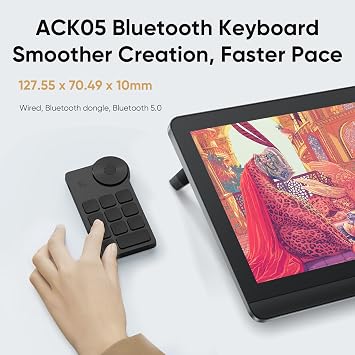
- ACK05 Wireless Shortcut Keyboard: Featuring a standout physical dial for comfortable rotation and precise feedback, this remote boasts ten customizable keys. Awarded the Good Design Award 2023, it supports Bluetooth 5.0, enhancing your workspace flexibility and efficiency
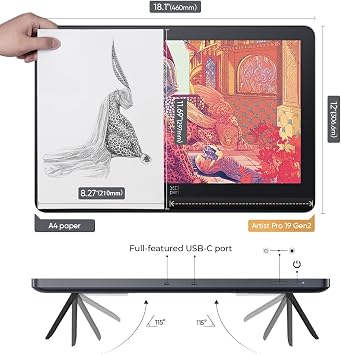
- Streamlined Setup and Flexibility: The dual reversible USB-C connections simplify installation and support HDMI input. This design allows professional artists to effortlessly switch between devices like MacBooks, Windows laptops, and tablets without compatibility issues. Both USB-C cables can connect your drawing display to your laptop or tablet, reducing the need for multiple cables and helping to keep your desktop organized. Additionally, the standard VESA adapter (75x75mm) offers versatile mounting options, while the wing-shaped stand ensures stable placement
- What You Get: H11 Pen Case *1(Built -in: X3 Pro Roller Stylus *1,X3 Pro Slim Stylus *1,Bluetooth Receiver for Wireless Shortcut Remote *1,Replaceable Button Cap for Slim Stylus *1 ,Standard Nib for Slim Stylus *4,Standard Nib for Roller Stylus *2,Felt Nib for Roller Stylus *2 ,Nib Extractor *1) ,3in1 Cable *1,USB-C to USB-C Cable *2,USB-C to USB-A Cable *1,PD Power Adapter *1,Wireless Shortcut Remote ACK05 *1 ,Drawing Glove*1 ,Cleaning Cloth *1,Pen Nibs Bag *1 (Built -in: Standard Nib for Slim Stylus *5,Standard Nib for Roller Stylus *5,Felt Nib for Roller Stylus *5)
- Exceptional Compatibility: The graphic tablet seamlessly works with a wide range of operating systems, including Windows 7 (or later), macOS 10.13 (or later), ChromeOS 88 (or later), Android (USB3.1 DP1.2), and Linux. It also supports a diverse array of popular digital art software, such as Adobe Photoshop, Illustrator, SAI, CorelDRAW, GIMP, Krita, MediBang, FireAlpaca, Toon Boom, Maya, and Blender 3D, ensuring that you can use it with the tools you prefer
- PLEASE NOTE: The 3 in 1 cable is included. It is NOT a standalone drawing tablet, you need to use it with your computer or laptop
| Brand | XP-Pen |
| Model Name | Artist Pro 19 Gen2 Drawing Tablet |
| Built-In Media | -3in1 Cable *1 -USB-C to USB-C Cable *2 -USB-C to USB-A Cable *1 -PD Power Adapter *1, -Drawing Glove*1 -Cleaning Cloth *1, -H11 Pen Case *1 Built -in: X3 Pro Roller Stylus *1 X3 Pro Slim Stylus *1 Bluetooth Receiver for Wireless Shortcut Remote *1 Replaceable Button Cap for Slim Stylus *1 Standard Nib for Slim Stylus *4 Standard Nib for Roller Stylus *2 Felt Nib for Roller Stylus *2 Nib Extractor *1, -Pen Nibs Bag *1 Built -in: Standard Nib for Slim Stylus *5 Standard Nib for Roller Stylus *5 Felt Nib for Roller Stylus *5, -Wireless Shortcut Remote ACK05 *1 |
| Target Audience | Artist, Photo Editor, Student, Teacher, Video Editor |
| Model Number | Artist Pro 19 Gen2 |
| Manufacturer | XP-PEN |
| Mfr Part Number | MD180UH |
| Unit Count | 1.0 Count |
| Connectivity Technology | 3-in-1 Cable, USB-C to USB-C Cable |
| Pressure Sensitivity | 16384 Levels |
| Operating System | Android (USB3.1 DP1.2), ChromeOS 88 (or later), Linux, MacOS 10.13(or later), Windows 7 (or later) |
| Additional Features | 4K UHD (3840x2160) resolution, AG etched glass/TÜV SÜD certified, Anti-Glare Glass, Calman Verified/ △E < 1.5, Dual Stylus/ACK05 Wireless Shortcut Keyboard |
| Specific Uses For Product | Drawing,Amimation,Designing,E-Signature,Editing,Painting, Photo editing,lllustration,Online education,Document markup,Signing, Teaching,Online Education,3D Modelling,Writing,Remote Work,Graphic design,lmage |
| Compatible Devices | Android (USB3.1 DP1.2), ChromeOS 88 (or later), Linux, MacOS 10.13(or later), Windows 7 (or later) |
| Display Type | LCD |
| Native Resolution | 3840x2160 |
| Screen Size | 18.4 Inches (46.7 cm) |
| Item Dimensions L x W | 19"L x 14"W (48.3 cm) |
| Active Surface Area | 16.1 x 9.06 inch (40.9 cm) |
| Color | Dark Silver |
| Special Feature | 4K UHD (3840x2160) resolution, AG etched glass/TÜV SÜD certified, Anti-Glare Glass, Calman Verified/ △E < 1.5, Dual Stylus/ACK05 Wireless Shortcut Keyboard See more |
What's in the box
-H11 Pen Case *1 Built -in: X3 Pro Roller Stylus *1 X3 Pro Slim Stylus *1 Bluetooth Receiver for Wireless Shortcut Remote *1 Replaceable Button Cap for Slim Stylus *1 Standard Nib for Slim Stylus *4 Standard Nib for Roller Stylus *2 Felt Nib for Roller Stylus *2 Nib Extractor *1
-3in1 Cable *1 -USB-C to USB-C Cable *2 -USB-C to USB-A Cable *1 -PD Power Adapter *1
-Wireless Shortcut Remote ACK05 *1
-Drawing Glove*1 -Cleaning Cloth *1
-Pen Nibs Bag *1 Built -in: Standard Nib for Slim Stylus *5 Standard Nib for Roller Stylus *5 Felt Nib for Roller Stylus *5
Who Should Buy?

-
Professional Artists
Ideal for digital illustrators seeking a high-resolution and responsive surface for detailed artwork and color accuracy.
-
Graphic Designers
Great for designers needing accurate color representation and pressure sensitivity for creating graphics and layouts.
-
Art Students
Perfect for students pursuing digital art, offering features that enhance learning and creativity in a portable format.

-
Casual Users
Not suitable for hobbyists who need basic functionality without advanced features and higher price points.
-
Budget-Conscious Buyers
May not meet needs for those looking for an affordable tablet without compromising on quality and features.
-
Non-Artistic Professionals
Not designed for users in fields unrelated to art, like standard office work or basic document processing.
Product Description
Have any Query? Chat with us
Customer Questions & Answers
-
Question:
What makes the XPPen 4K UHD Artist Pro 19 Gen2 Drawing Tablet stand out?
Answer: The XPPen 4K UHD Artist Pro 19 Gen2 Drawing Tablet stands out due to its stunning 4K resolution, delivering crisp and detailed visuals that enhance the drawing experience. With 156% sRGB color coverage and 1.07 billion colors, artists can expect vibrant and accurate color representation. This tablet is designed for professional use, making it ideal for graphic design, digital painting, and animation. Its anti-glare drawing monitor minimizes reflections, allowing for comfortable long-lasting use, making it perfect for both beginners and seasoned professionals. -
Question:
Is the XPPen 4K UHD Artist Pro 19 compatible with various software?
Answer: Yes, the XPPen 4K UHD Artist Pro 19 is compatible with a wide range of software, including Adobe Photoshop, Illustrator, CorelDRAW, and more. This versatility allows you to use the tablet with your preferred applications seamlessly. The driver is easy to install and supports various operating systems, enabling users to customize their experience. Whether you're creating intricate illustrations or editing photos, this tablet's compatibility ensures it meets your creative needs. -
Question:
What features enhance the usability of the XPPen 4K UHD Artist Pro 19?
Answer: The XPPen 4K UHD Artist Pro 19 includes several features that enhance usability, such as customizable shortcut keys and a pressure-sensitive stylus. This stylus supports up to 8192 levels of sensitivity, allowing for precise control over your brush strokes and lines. The anti-glare screen not only protects your eyes but also enhances visibility in different lighting conditions. These features make it a suitable choice for artists looking to improve their workflow and efficiency. -
Question:
Can I use the tablet for graphics and photo editing?
Answer: Absolutely! The XPPen 4K UHD Artist Pro 19 is specifically designed for graphics and photo editing. Its ultra-high definition and color accuracy make it perfect for professionals. You can manipulate images, adjust colors, and create artwork with incredible detail. Artists and photographers alike will appreciate how the tablet enables precise editing and creativity, whether you are enhancing photos or designing intricate graphics. -
Question:
How does the anti-glare feature benefit users?
Answer: The anti-glare feature on the XPPen 4K UHD Artist Pro 19 is particularly beneficial for those who work in brightly lit environments. It minimizes reflections and glare, which can cause eye strain and diminish the quality of your work. This allows users to work comfortably for extended periods without distractions. Whether you're in a studio or a coffee shop, the anti-glare screen ensures an enjoyable drawing experience in various settings. -
Question:
What type of artists would benefit from using this tablet?
Answer: The XPPen 4K UHD Artist Pro 19 is ideal for a wide range of artists, including graphic designers, digital painters, illustrators, and animators. Its high-resolution display and color accuracy are particularly advantageous for those creating detailed illustrations or complex graphics. Professionals looking to elevate their skills will find this tablet beneficial for executing intricate designs and vibrant artworks, making it a must-have for any serious artist. -
Question:
What connectivity options does the XPPen 4K UHD Artist Pro 19 offer?
Answer: The XPPen 4K UHD Artist Pro 19 offers versatile connectivity options including USB-C and HDMI ports, allowing you to connect it easily to computers or other devices. This ensures seamless integration into your existing setup. Whether you're working from a desktop or a laptop, the connectivity options help you get started right away without any hassle. Additionally, users can connect the tablet to various operating systems without compatibility issues. -
Question:
Is the stylus included with the XPPen 4K UHD Artist Pro 19?
Answer: Yes, the XPPen 4K UHD Artist Pro 19 comes with a stylus included in the package. This stylus is not only comfortable to hold but also features pressure sensitivity for an enhanced drawing experience. It allows artists to execute their work with precision and control, making it a critical tool for anyone serious about digital art. The included stylus is designed to replicate the feel of traditional drawing instruments, facilitating a natural drawing experience. -
Question:
Does the tablet support multi-touch functionality?
Answer: No, the XPPen 4K UHD Artist Pro 19 does not support multi-touch functionality. While some tablets feature multi-touch for gestures, this model is specifically designed for precision with its stylus. Users can still navigate and control their work efficiently using the stylus and shortcut keys. This focused approach helps artists concentrate on their creativity without the distraction of multi-touch gestures, making it a streamlined tool for serious work. -
Question:
Where can I buy the XPPen 4K UHD Artist Pro 19 Gen2 Drawing Tablet?
Answer: You can buy the XPPen 4K UHD Artist Pro 19 Gen2 Drawing Tablet from Ubuy. Ubuy offers a reliable platform for purchasing electronic products, often featuring great deals and customer support. By shopping at Ubuy, you can easily access a broad range of tech products, ensuring you find the right fit for your creative needs.
XP-Pen Graphics Tablets Artist Pro 19 Gen2 Editorial Review


The XPPen Artist 22 2nd drawing tablet with a 21.5-inch pen display is a good option for artists looking for a large screen tablet that comes with a battery-free stylus that has an impressive 8192 levels of pressure sensitivity. Customers have praised the tablet for being easy to use and helpful for small details while painting and drawing. However, some users have expressed difficulties with the pen sensitivity at times and driver issues on Windows 10. One customer was disappointed with how the device became useless after a Windows update and the company offered no patch to resolve it. Additionally, some people have reported random lines and flickering on the screen, and graphic tablets cannot be used comfortably after one year. Overall, the device functioned well for many users, but some have encountered issues that require specific knowledge to overcome.
Customer Reviews & Ratings
182 customers ratings
-
5 Star
73%
-
4 Star
12%
-
3 Star
5%
-
2 Star
4%
-
1 Star
6%
Review this product
Share your thoughts with other customers
Pros
- Large 21.5-inch pen display
- Battery-free stylus with 8192 levels of pressure sensitivity
- Easy to use and helpful for small details while painting and drawing
Cons
- Device can become unusable after one year
Product Price History
Important information
- Limitations : For products shipped internationally, please note that any manufacturer warranty may not be valid; manufacturer service options may not be available; product manuals, instructions, and safety warnings may not be in destination country languages; the products (and accompanying materials) may not be designed in accordance with destination country standards, specifications, and labeling requirements; and the products may not conform to destination country voltage and other electrical standards (requiring use of an adapter or converter if appropriate). The recipient is responsible for assuring that the product can be lawfully imported to the destination country. When ordering from Ubuy or its affiliates, the recipient is the importer of record and must comply with all laws and regulations of the destination country.
- Not all the products listed on Ubuy are for sale, as Ubuy is a global search engine. Products are subject to export/trade regulations.
€ 813
Order now and get it around Tuesday, June 30
This item is not restrict in my country.(Please click on above link if this item is not restrict in your country, So our team will review and allow.)
QTY:
Secured transaction
Ubuy works hard to protect your security and privacy. Our advanced payment security system ensures confidentiality by encrypting your information during transmission using AES (Advanced Encryption Standards) and SSL (Secure Socket Layer) protocols. Your payment details are 100% secure as we do not share your payment details with third party sellers.
Our Top Logistics Partners
Fastest cross-border delivery
Features & Benefits
- USB-C to USB-C connection
- Adjustable stand
- More precise cursor positioning
- Richer color gamut
- Premium pen technology
- Wide compatibility