- Pagina inicial /
- Eletrónica /
- Television & Video /
- Acessórios para Televisão /
- Comandos /
- Repair Membrane for Logitech Harmony Remote 6...
0 ratings




Artigo n.º:
40543004
Repair Membrane for Logitech Harmony Remote 600 650 665 700
86% of respondents would recommend this to a friend
Artigo n.º:
40543004
€ 34
Detalhes do Preço
Excluindo custos de envio e alfandegários ( Os custos de envio e alfandegários serão calculados na finalização da compra )
*Todos os artigos serão importados de EUA
0 ratings
Escrever uma avaliação
Em stock
 Importado da loja USA
Qtd.:
Encomende já e receba por volta de Terça-feira, Outubro 13
Transação segura
A Ubuy trabalha arduamente para proteger a sua segurança e privacidade. O nosso sistema avançado de segurança de pagamentos garante a confidencialidade ao encriptar as suas informações durante a transmissão, utilizando os protocolos AES (Normas de Encriptação Avançada) e SSL (Camada de Sockets Seguros). Os seus dados de pagamento estão 100% seguros, pois não partilhamos os seus dados de pagamento com vendedores terceiros.
Os nossos principais Parceiros Logísticos


ButtonWorx is the only button repair that can last, Tested over 1 million button presses!

Fast
Shipping

Devolução
gratuita*

Embalagem Segura

Produtos 100% Originais

Certificação PCI DSS

Certificação ISO 27001





Note: Step Down Voltage Transformer required for using electronics products of EUA store (110-120). Recommended power converters COMPRAR AGORA.


O que se Destaca
Precision Fit
Designed specifically for Logitech Harmony Remote models 600, 650, 665, and 700, ensuring a perfect fit that restores functionality and enhances user experience while prolonging the remote's lifespan.
Easy Installation
User-friendly installation process allows for quick replacement without the need for professional assistance, making it accessible for anyone to restore their remote quickly and efficiently.
Durable Quality
High-quality materials ensure long-lasting durability, resisting wear and tear while providing a reliable solution that protects devices and enhances usability for everyday remote control functions.
Detalhes do produto
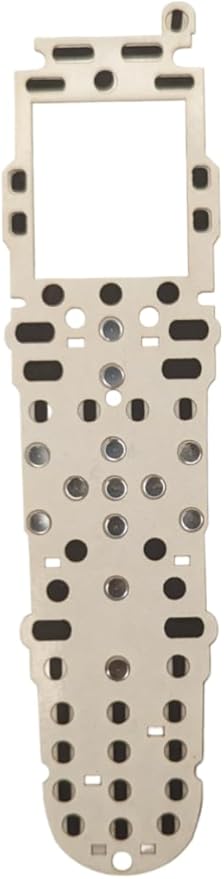
- ButtonWorx membrane repair kit is designed for Logitech Harmony Remote Models 600, 650, 665, and 700, and it is installed onto the circuit board under the original keypad.
- The repair kit facilitates the completion of the switch by pressing down on the ButtonWorx pad when the old rubber buttons engage, effectively taking over the electrical function of the original rubber buttons.
- Tested over 1 million button presses, the repair kit is specifically designed to address the wear and tear issues of rubber contact buttons, particularly for directional, channel, and volume functions.
- Featuring a 2mm thick acrylic light pipe plastic, the repair kit requires careful placement to ensure it covers the power button on the top left and properly touches the circuit board. Additionally, the light pipe plastic needs to be positioned on top of the repair, completing the layers as follows: 1. Green circuit board, 2. Paper-thin white sticker holding the metal snap domes in place, 3. ButtonWorx membrane repair pad, 4. Thick plastic light pipe with white reflector, and 5. Original rubber keypad.
- Updated in 2023, the repair kit now offers an easy Put-In-Place installation, although it does require disassembly of the remote for installation
- The ButtonWorx repair membrane is the only solution that can effectively address the wear issues with rubber keypads, providing a long-lasting fix. It is a reliable alternative to traditional peel-and-stick pieces.
| Additional Features | Ergonomic |
| Maximum Number of Supported Devices | 1 |
| Compatible Devices | Logitech Harmony Remote Models 600, 650, 665, 700 |
| Connectivity Technology | Infrared |
| Button Quantity | 41 |
| Controller Type | Button Control |
| Color | Grey |
| Brand | buttonworx |
| Model Name | 600 |
| Model Number | 600 or 650 or 665 or 700 |
| Global Trade Identification Number | 00860006556334 |
| Number of Items | 1 |
| Unit Count | 1 Count |
| Manufacturer | P1Repair |
| Mfr Part Number | BW-LH700 |
| Special Feature | Ergonomic |
| Max Number of Supported Devices | 1 |
| Package Weight | 1 Pound |
Quem Deverá Comprar?

-
DIY Enthusiasts
Individuals who enjoy repairing their devices will appreciate the ease of use and cost-effectiveness of this product.
-
Harmony Remote Users
Users of models 600, 650, 665, and 700 will find this replacement membrane perfect for restoring functionality.
-
Budget-Conscious Consumers
People looking to save money on replacing their remotes will benefit from this affordable repair option.

-
Non-Technical Users
Individuals with limited technical skills may struggle to install the repair membrane successfully on their remote.
DESCRIÇÃO DO PRODUTO
About This Item
Introducing the ButtonWorx Repair Membrane for Logitech Harmony Remote Models 600, 650, 665, and 700! Are you tired of dealing with worn-out buttons on your Logitech Harmony remote? Look no further, because we have the perfect solution for you. The ButtonWorx Repair Membrane is designed specifically for Logitech Harmony remotes, providing a quick and easy fix for unresponsive or worn-out buttons. Compatible with a wide range of Logitech Harmony remote models, including the popular Logitech Harmony 650, 665, and 700, this replacement membrane ensures that your remote stays in perfect working condition. With its easy installation process, you don't need any professional help to fix your remote.
Simply remove the old membrane and replace it with the ButtonWorx Repair Membrane. It's as easy as that! Not only will this replacement membrane restore the functionality of your Logitech Harmony remote, but it will also enhance its durability. Made with high-quality materials, the ButtonWorx Repair Membrane is built to last, ensuring that you can continue enjoying seamless control over your devices for years to come. Investing in the ButtonWorx Repair Membrane means saving yourself the hassle and expense of purchasing a brand new remote.
You'll be amazed at how a simple replacement can bring new life to your Logitech Harmony remote. Don't let worn-out buttons ruin your remote control experience. Upgrade your Logitech Harmony remote with the ButtonWorx Repair Membrane today and say goodbye to unresponsive buttons. Order now and regain full control over your devices!.
Tem alguma Dúvida? Converse connosco
Perguntas e respostas do cliente
-
Pergunta:
Como comprar Repair Membrane for Logitech Harmony Remote 600 650 online na Ubuy?
Resposta: É fácil comprar Repair Membrane for Logitech Harmony Remote 600 650 online na Ubuy.. Você só precisa procurar o produto, escolher a forma de envio na hora de finalizar a compra e receber no seu endereço. -
Pergunta:
Repair Membrane for Logitech Harmony Remote 600 650 está disponível para compras online em Portugal?
Resposta: Sim, na Ubuy Portugal este produto está disponível para você comprar a um preço razoável.. O Repair Membrane for Logitech Harmony Remote 600 650 não está disponível localmente, mas você pode confiar em nós com nossos serviços de remessa expressa. -
Pergunta:
Quanto tempo leva para receber o produto após fazer o pedido?
Resposta: O tempo de entrega do seu produto encomendado varia de acordo com o que você pediu e o método de envio que você escolheu.. O tempo estimado de entrega é mencionado durante o processo de checkout, portanto, fique despreocupado ao fazer compras.
buttonworx Remote Controls 600 or 650 or 665 or 700 Editorial Review


The Logitech Harmony Button Repair kit is a great solution for those experiencing issues with their Logitech remote control buttons. This kit is easy to install and does not require any particular skills, making it suitable for anyone who can follow simple instructions. The buttons are now more responsive and firmer after the upgrade. This repair kit fixes conductive sheet issues that restore buttons to work like new. Watching the video on YouTube is highly recommended to install the kit correctly. One may need to be patient when placing the buttons since they are tiny, but the effort is worth it. The repair will outlast the remote. However, some customers mention that the hardest part of the repair is opening and reassembling the remote. Thus, it is important to follow the instructions provided in the video.
Avaliações e Classificações dos Clientes
204 classificações de clientes
-
5 Estrela
88%
-
4 Estrela
7%
-
3 Estrela
3%
-
2 Estrela
1%
-
1 Estrela
1%
Avaliar este produto
Partilhe as suas ideias com outros clientes
Prós
- Easy installation
- Makes buttons more responsive
- Saves money and avoids purchasing a new remote
- Highly recommended to watch YouTube video
Contras
- Some customers experienced difficulty opening and reassembling remote
Histórico de preços do produto
Informação importante
- Limitações: para produtos expedidos internacionalmente, tenha em atenção que qualquer garantia do fabricante pode não ser válida; opções de serviço do fabricante podem não estar disponíveis; manuais de produtos, instruções e avisos de segurança podem não estar nas línguas do país de destino; os produtos (e materiais que o acompanham) pode não ter sido concebido em conformidade com as normas, especificações e requisitos de rotulagem do país de destino; e os produtos podem não estar em conformidade com a voltagem e outras normas elétricas do país de destino (requerendo assim o uso de um adaptador ou conversor caso seja apropriado). O destinatário é responsável por garantir que o produto pode ser legalmente importado para o país de destino. Quando encomenda à Ubuy ou aos seus afiliados, o destinatário é o importador de registo e deve estar em conformidade com todas as leis e regulamentos do país de destino.
- Nem todos os produtos listados na Ubuy estão à venda, uma vez que a Ubuy é um motor de busca global. Os produtos estão sujeitos a leis de exportação/comércio.
€ 34
Encomende já e receba por volta de Terça-feira, Outubro 13
Este artigo não está restrito no meu país. (Clique no link acima se este artigo não estiver restrito no seu país, para que a nossa equipa o analise e permita.)
Qtd.:
Transação segura
Em conformidade com a norma PCI DSS e com certificação ISO 27001:2022, com pagamentos encriptados e proteção total do comprador em todas as encomendas.
Os nossos principais Parceiros Logísticos
Entrega internacional mais rápida
Recursos e benefícios
- ButtonWorx membrane repair kit lasts long
- 2023 updated with easy Put-In-Place installation
- Needs disassembling and cleaning the device for installation
- Repairs all worn out rubber contact buttons
- Directional, channel and volume keys can only be cleaned
- Comes with 2mm thick acrylic light pipe plastic for placement
Ubuy Assurance
Experience worry-free shopping with 100% original products, PCI DSS-compliant payment security, ISO 27001-certified data protection, the fastest cross-border delivery, free returns *, and secure packaging on every order.