- Pagina inicial /
- Eletrónica /
- Computer Accessories /
- Computer Accessories & Peripherals /
- Input Devices /
- Touch Pads /
- Bluetooth Touchpad Multi-Function Gestures Wi...
0 ratings

Artigo n.º:
104662236
Bluetooth Touchpad Multi-Function Gestures Wireless Trackpad Rechargeable for Windows OSX/Laptop/PC (Silver)
Artigo n.º:
104662236
€ 61
Price Details
Excluding Shipping & Custom charges ( Shipping and custom charges will be calculated on checkout )
*All items will import from EUA
0 ratings
Escreva um comentário
Em estoque
 Importado da loja USA
QTY:
Encomende já e receba por volta de Sunday, Agosto 09
Transação segura
A Ubuy trabalha arduamente para proteger a sua segurança e privacidade. O nosso sistema avançado de segurança de pagamentos garante a confidencialidade ao encriptar as suas informações durante a transmissão, utilizando os protocolos AES (Normas de Encriptação Avançada) e SSL (Camada de Sockets Seguros). Os seus dados de pagamento estão 100% seguros, pois não partilhamos os seus dados de pagamento com vendedores terceiros.
Os nossos principais Parceiros Logísticos


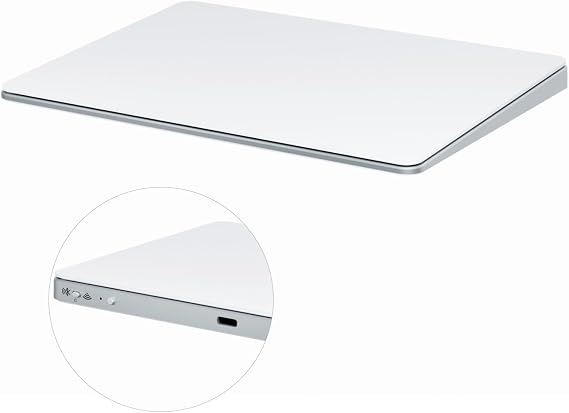
Ergonomically designed with a tempered glass touch surface for a seamless gesture control experience, this trackpad is the perfect companion for your PC or laptop.

Fast
Shipping

Devolução
gratuita*

Embalagem Segura

Produtos 100% Originais

Certificação PCI DSS

Certificação ISO 27001


Note: Step Down Voltage Transformer required for using electronics products of EUA store (110-120). Recommended power converters Compre Agora.


O que se Destaca
Multi-Function Gestures
Offers a wide array of multi-touch gestures that enhance productivity and streamline navigation, providing a seamless user experience for both Windows and OSX users.
Rechargeable Design
Features a convenient rechargeable battery that eliminates the need for constant battery replacements, ensuring longer usage and environmental friendliness.
Versatile Compatibility
Designed to work effortlessly with various devices including laptops and PCs, making it an ideal accessory for users across different platforms seeking efficiency and versatility.
Detalhes do produto
| Item Weight | 0.5 lbs (230 grams) |
Quem Deverá Comprar?

-
Frequent Travelers
Lightweight and portable, this trackpad is ideal for users who work on-the-go and need a compact solution.
-
Mac Users
Compatible with OSX, Mac users will benefit from seamless integration and multi-touch gestures for ease of use.
-
Design Professionals
Graphic designers can utilize precise gestures and touch controls for enhanced workflow while using creative software.

-
Gaming Enthusiasts
Gamers may find this trackpad lacks the necessary precision and speed required for competitive gaming environments.
-
Budget-Conscious Users
Those looking for a cost-effective solution might find this product pricier compared to basic wired alternatives.
-
Heavy Users
Individuals who use input devices extensively may prefer traditional mice for better ergonomics and prolonged comfort.
DESCRIÇÃO DO PRODUTO
Bluetooth Touchpad Multi-Function Gestures Wireless Trackpad Rechargeable for Windows OSX/Laptop/PC (Silver)
Tem alguma Dúvida? Converse connosco
Perguntas e Respostas dos Clientes
-
pergunta:
What devices are compatible with the Bluetooth Touchpad Multi-Function Gestures Wireless Trackpad?
Resposta: The Bluetooth Touchpad is compatible with a variety of devices, including laptops and PCs running both Windows OS and macOS. This versatility allows users to enjoy multi-function gestures and a wireless connection across different platforms, making it ideal for both casual users and professionals. For example, if you have a Windows laptop and an Apple desktop, you can seamlessly switch the trackpad between the two setups, enhancing your productivity. -
pergunta:
How do I charge the Bluetooth Touchpad?
Resposta: Charging the Bluetooth Touchpad is simple and convenient. It comes with a rechargeable battery and uses a USB-C charging port. To charge it, simply connect the provided cable to a power source, and the trackpad will charge rapidly. Many users appreciate this feature, as it eliminates the need for disposable batteries and allows for hassle-free usage. Typically, you'll find that a full charge can last for weeks depending on usage. -
pergunta:
What gesture controls does the Bluetooth Touchpad support?
Resposta: This trackpad supports a variety of gesture controls that enhance your navigation experience. Users can perform functions like scrolling, zooming, and swiping through applications with simple finger movements. For instance, a three-finger swipe can be used to switch between applications on Windows, making multitasking much more efficient. This is especially useful for creative professionals who rely on quick access to tools and features. -
pergunta:
Is it difficult to set up the Bluetooth Touchpad?
Resposta: Setting up the Bluetooth Touchpad is straightforward and user-friendly. Simply turn on the trackpad, enable Bluetooth on your device, and pair them by selecting the trackpad from the list of available devices. The process takes only a few minutes. Users often appreciate how intuitive this setup is, especially those new to Bluetooth devices. Once paired, the trackpad is ready for immediate use. -
pergunta:
Can I customize the gestures on the Bluetooth Touchpad?
Resposta: Yes, many Bluetooth Touchpads, including this model, come with customizable gesture settings. You can often download accompanying software or access system settings to tailor gestures to meet your needs. For example, if you frequently use specific applications, you can set customized gestures to open them directly. This versatility allows users to personalize their experience, creating shortcuts for efficiency. -
pergunta:
What are the benefits of using a wireless trackpad over a traditional mouse?
Resposta: Using a wireless trackpad offers several advantages over traditional mice. First, it provides a more compact solution, reducing desk clutter. Second, gestural navigation can often be quicker for tasks like scrolling and zooming. Users in design or editing fields often find trackpads more conducive for creative tasks that require precision, such as photo editing or graphic design work, thanks to their smooth surface and advanced gesture support. -
pergunta:
How does the sensitivity of the Bluetooth Touchpad compare to that of a mouse?
Resposta: The sensitivity of the Bluetooth Touchpad is designed to be responsive and precise, often on par with or even surpassing that of a standard mouse. This ensures that users can navigate with precision whether they're working on graphic design or gaming. Many users find that the touch responsiveness allows for quicker interactions, particularly for tasks involving multi-finger gestures, which is not possible with a traditional mouse. -
pergunta:
What color options are available for the Bluetooth Touchpad?
Resposta: While this specific model is available in a sleek silver finish, many brands often offer various colors to match different setups. If you prefer a unique aesthetic for your workspace, you might explore other models that offer colors like black, white, or even vibrant hues. This allows you to complement the look of your laptop or desktop setup, adding a personal touch to your workspace. -
pergunta:
Can multiple users connect to the Bluetooth Touchpad?
Resposta: Typically, Bluetooth devices can be paired with multiple systems, but only one connection can be active at a time. This means that if you're working in a shared environment, one user can connect their device while others may need to disconnect first. This feature is particularly useful in office settings where multiple users might want to use the same trackpad, allowing easy sharing without physical connections. -
pergunta:
Where can I buy the Bluetooth Touchpad Multi-Function Gestures Wireless Trackpad?
Resposta: You can buy the Bluetooth Touchpad Multi-Function Gestures Wireless Trackpad Rechargeable for Windows OSXLaptopPC Silver at Ubuy. Ubuy is known for its extensive selection of tech gadgets and accessories, ensuring that you have access to various products, including this trackpad. Whether you're looking for additional features or related peripherals, Ubuy provides an easy shopping experience tailored to your needs.
Zexxivop Touch Pads Editorial Review
Nenhuma revisão editorial encontrada
Avaliações e Classificações dos Clientes
1 classificações de clientes
-
5 Estrela
100%
-
4 Estrela
0%
-
3 Estrela
0%
-
2 Estrela
0%
-
1 Estrela
0%
Avaliar este produto
Partilhe as suas ideias com outros clientes
Platform Trust & Buyer Confidence

MT
Mohd
Verified buyer
“The product received very good packaging & safe…Thank You”
16 June 2026 · via Trustpilot
SJ
Shawati
Verified buyer
“Accurate delivery timing given”
16 June 2026 · via Trustpilot
YB
Youcef
Verified buyer
“Not madly expensive like I thought, and much quicker than promised.”
15 June 2026 · via Trustpilot
LM
Leila
Verified buyer
“Never dealt with Ubuy before, but everything worked out great. Seamless cross border purchasing and shipping. Thanks!”
6/7/2026 · via Trustpilot
KA
Kwame
Verified buyer
“The process was smooth, with clear communication and timelines. This was my 1st purchase and I am really impressed. I will definitely be coming back.”
12 June 2026 · via Trustpilot
Checkout Seguro
Global Delivery
Devoluções Fáceis
Genuine Products
Histórico de preços do produto
Informação importante
- Limitações: para produtos expedidos internacionalmente, tenha em atenção que qualquer garantia do fabricante pode não ser válida; opções de serviço do fabricante podem não estar disponíveis; manuais de produtos, instruções e avisos de segurança podem não estar nas línguas do país de destino; os produtos (e materiais que o acompanham) pode não ter sido concebido em conformidade com as normas, especificações e requisitos de rotulagem do país de destino; e os produtos podem não estar em conformidade com a voltagem e outras normas elétricas do país de destino (requerendo assim o uso de um adaptador ou conversor caso seja apropriado). O destinatário é responsável por garantir que o produto pode ser legalmente importado para o país de destino. Quando encomenda à Ubuy ou aos seus afiliados, o destinatário é o importador de registo e deve estar em conformidade com todas as leis e regulamentos do país de destino.
- Nem todos os produtos listados na Ubuy estão à venda, uma vez que a Ubuy é um motor de busca global. Os produtos estão sujeitos a leis de exportação/comércio.
€ 61
Encomende já e receba por volta de Sunday, Agosto 09
Este artigo não está restrito no meu país. (Clique no link acima se este artigo não estiver restrito no seu país, para que a nossa equipa o analise e permita.)
QTY:
Transação segura
PCI DSS compliant and ISO 27001:2022 certified, with encrypted payments and full buyer protection on every order.
Os nossos principais Parceiros Logísticos
Entrega internacional mais rápida
Recursos e benefícios
- Ergonomically designed for superior comfort during use.
- Tempered glass surface enhances touch responsiveness.
- Supports PC, Desktop, and Laptop with macOS and Windows compatibility.
- Battery life lasts up to 15 days with 2-3 hours of continuous use.
- Features gesture control; no left/right pressing functionality.
- Includes trackpad, manual, cable, 2.4G receiver, and USB to type-C connector.
Ubuy Assurance
Experience worry-free shopping with 100% original products, PCI DSS-compliant payment security, ISO 27001-certified data protection, the fastest cross-border delivery, free returns *, and secure packaging on every order.