- Pagina inicial /
- Eletrónica /
- Computer Accessories /
- Computer Accessories & Peripherals /
- Keyboards, Mice & Accessories /
- Mice /
- ProtoArc EM11 Pro Ergonomic Bluetooth Mouse f...
0 ratings






Artigo n.º:
234928302
ProtoArc EM11 Pro Ergonomic Bluetooth Mouse for Large Hands, Vertical Mouse with Side Scroll and 6 Programmable Buttons, 7200 DPI, Multi-Device,
Artigo n.º:
234928302
€ 65
Detalhes do Preço
Excluding Shipping & Custom charges ( Shipping and custom charges will be calculated on checkout )
*All items will import from EUA
Em stock
 Importado da loja USA
Qtd.:
Encomende já e receba por volta de Quarta-feira, Agosto 05
Transação segura
A Ubuy trabalha arduamente para proteger a sua segurança e privacidade. O nosso sistema avançado de segurança de pagamentos garante a confidencialidade ao encriptar as suas informações durante a transmissão, utilizando os protocolos AES (Normas de Encriptação Avançada) e SSL (Camada de Sockets Seguros). Os seus dados de pagamento estão 100% seguros, pois não partilhamos os seus dados de pagamento com vendedores terceiros.
Os nossos principais Parceiros Logísticos


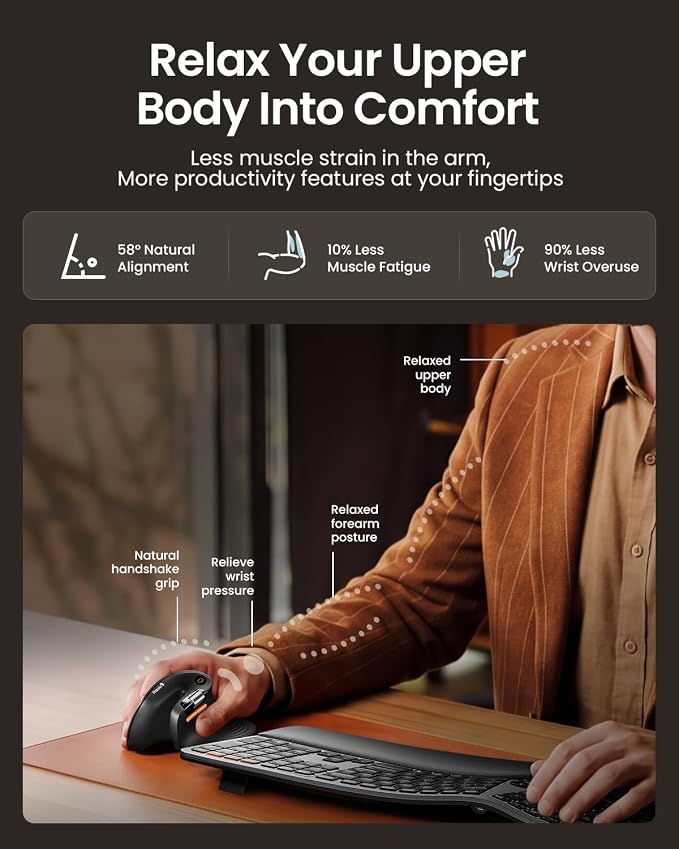
Choose the EM11 Pro for browser-based button customization, a time-saving side scroll wheel, and a 58° ergonomic design that reduces wrist fatigue by 90%.

Fast
Shipping

Devolução
gratuita*

Embalagem Segura

Produtos 100% Originais

Certificação PCI DSS

Certificação ISO 27001


Note: Step Down Voltage Transformer required for using electronics products of EUA store (110-120). Recommended power converters COMPRAR AGORA.


O que se Destaca
Design ergonômico
Specifically designed for large hands, the ProtoArc EM11 Pro promotes healthy wrist posture, reducing strain during extended use, making it ideal for professionals and gamers alike.
Multi-Device Connectivity
Seamlessly switch between multiple devices with Bluetooth capability. This versatile mouse enhances productivity by allowing users to control Windows, Mac, and Android devices effortlessly.
Programmable Features
Features six customizable buttons and side scroll functionality to tailor operations for various tasks. Users gain efficiency by personalizing their mouse to suit specific workflows.
Detalhes do produto
- Advanced Customization Web: No software to download. Configure 6 buttons, adjust DPI levels, and personalize your workflow—all from your browser without installing a single file. Create custom buttons for your favorite shortcuts, like copy/paste, Please note that the side scroll wheel cannot be customized
- Horizontal Scroll Wheel for Ease: This ergonomic wireless mouse features a side-mounted scroll wheel that lets you pan left and right with a gentle flick of your finger. Whether you're working on wide spreadsheets, long web pages, or expansive design canvases, horizontal scrolling becomes instant and natural—saving you precious time on view adjustments to boost productivity and workflow smoothness
- Ergonomic Vertical Design: Our ergonomic mouse wireless keeps your wrist naturally straight, putting your forearm and wrist in a more natural and relaxed position, which can reduce discomfort and strain, helping to improve productivity and reduce the risk of repetitive strain injuries compared to a standard mouse. Warm tips: We encourage you to relax your palm and hold the mouse naturally when using a vertical mouse
- Perfect fit for Large hands: Recommended hand size: 19.0–21.5 cm (7.5–8.5"), and its ergonomic grip effectively reduces wrist fatigue. For a better fit and comfort, please measure your hand size before ordering
- Connect up to 3 Devices: This ergonomic bluetooth mouse features dual Bluetooth and 2.4G USB-A connectivity modes for simultaneous connection of up to 3 different devices, and is compatible with Windows 8, Windows 10 or higher, Mac OS X 10.12 or higher, and Android 4.3 or higher
- Rechargeable Vertical Mouse: The Bluetooth Ergonomic Mouse has a built-in 500mAh Li-Ion battery that can be conveniently recharged using the included Type-C cable(The Type-C cable is for charging only)
- Adjustable DPI & Quiet Click : Up to 7200 DPI levels match your preferred speed and accuracy for different tasks; with the back and forward buttons, you can easily navigate websites and increase work efficiency.The silent click sound of the left and right mouse buttons help you focus on your work
- Learning curve: Since it takes a learning curve to get used to the shape when using our ergonomic mouse for the first time, it may cause inconvenience to your mouse grip, We recommend that you take 1-2 weeks to get used to it, as many users find that it will help reduce the pressure and pain on your wrist caused by long-term use of the mouse and improve comfort
| Tecnologia de Conectividade | Bluetooth, USB |
| Recursos Adicionais | Ergonomic Design, Multi-Device, Programmable Buttons, Rechargeable, Wireless |
| Movement Detection | Optical |
| Quantidade de botões | 6 |
| Orientação das mãos | Direita |
| Dispositivos Compatíveis | Personal Computer, Tablet |
| Sistema Operacional | Android 4.3 or higher, Mac OS X 10.12 or higher, Windows 8, Windows 10 or higher |
| Número de Baterias | 1 Nonstandard Battery batteries required. |
| Plataforma de hardware | Mac, PC, Windows,Linux |
| Fonte de Energia | Bateria Alimentada |
| Mouse Maximum Sensitivity | 7200 dots_per_inch (18288 cm) |
| Versão mínima necessária do sistema operacional | Windows 8 |
| Peso do Item | 125 g |
| Contagem de Unidades | 1 Contagem |
| Marca | ProtoArc |
| Localização da Antena | Escritório |
| Número do Modelo | EM11 Pro |
| Mídia Integrada | 1 x 2.4G USB-A Receiver, 1 x ProtoArc Rechargeable Bluetooth Ergonomic Mouse, 1 x Type-C Charging Cable(The Type-C cable is for charging only), 1 x User Manual |
| Fabricante | ProtoArc |
| Número da Peça do Fabricante | EM11 Pro |
| Cor | Preto |
| Nome do Estilo | Moderno |
| Recurso Especial | Ergonomic Design, Multi-Device, Programmable Buttons, Rechargeable, Wireless |
| Movement Detection Technology | Optical |
What's in the box
1 x ProtoArc Rechargeable Bluetooth Ergonomic Mouse
1 x 2.4G USB-A Receiver
1 x Type-C Charging Cable(The Type-C cable is for charging only)
1 x User Manual
DESCRIÇÃO DO PRODUTO
Tem alguma Dúvida? Converse connosco
Perguntas e Respostas dos Clientes
-
Pergunta:
What makes the ProtoArc EM11 Pro Ergonomic Bluetooth Mouse suitable for large hands?
Resposta: The ProtoArc EM11 Pro is specifically designed for users with larger hands, providing a comfortable grip that reduces strain during prolonged use. Its vertical mouse design promotes a natural wrist position, minimizing the risk of repetitive strain injuries. This ergonomic shape allows for better control and ease of use for tasks requiring precision, such as graphic design or gaming. This mouse is ideal for professionals working in offices or at home who value comfort and functionality. -
Pergunta:
How does the side scroll feature work on the ProtoArc EM11 Pro?
Resposta: The ProtoArc EM11 Pro comes equipped with a unique side scroll feature that allows users to navigate horizontally through spreadsheets or large documents effortlessly. This function is controlled by a designated button on the mouse, providing a smooth and intuitive experience. It's particularly beneficial when editing large files or reviewing presentations, making it an excellent tool for professionals and students who often work with extensive datasets or design projects. -
Pergunta:
What are the advantages of using a vertical mouse like the ProtoArc EM11 Pro?
Resposta: Using a vertical mouse like the ProtoArc EM11 Pro helps reduce wrist strain and promotes a more natural hand position. This ergonomic design encourages a handshake posture, which decreases tension in the arm and wrist, making it a great option for those who spend long hours at the computer. It's particularly useful for graphic designers, data analysts, or anyone engaged in extensive computer work, helping to maintain comfort and prevent discomfort over time. -
Pergunta:
Can the ProtoArc EM11 Pro connect to multiple devices?
Resposta: Yes, the ProtoArc EM11 Pro supports multi-device connectivity, allowing users to switch seamlessly between multiple devices, such as computers, tablets, and smartphones. This versatility is especially advantageous for professionals who work across various platforms, as it streamlines productivity. For instance, a user may effortlessly transition from using a laptop for work to a tablet for casual browsing without needing to disconnect and reconnect, enhancing the overall user experience. -
Pergunta:
What DPI settings does the ProtoArc EM11 Pro offer?
Resposta: The ProtoArc EM11 Pro features a high DPI of up to 7200, ensuring precise tracking and responsiveness across different surfaces. Users can adjust the DPI settings to suit various tasks, such as increased sensitivity for gaming or lower sensitivity for pixel-perfect design work. This adaptability makes it suitable for both casual users and professionals who require high accuracy, ensuring that it meets a wide range of user needs. -
Pergunta:
What can I do with the 6 programmable buttons on the ProtoArc EM11 Pro?
Resposta: The ProtoArc EM11 Pro includes 6 customizable buttons that can be programmed to perform specific functions based on user preferences. This means you can set them up for quick access to frequently used commands, macros, or shortcuts. For example, graphic designers can program buttons for quick tool selection, while gamers can assign actions for strategy execution, enhancing efficiency and accelerating workflow across different applications. -
Pergunta:
Is the ProtoArc EM11 Pro compatible with various operating systems?
Resposta: Yes, the ProtoArc EM11 Pro is designed to work seamlessly with Windows, Mac, and Android operating systems, providing flexibility for users across different platforms. This cross-compatibility allows users to utilize the mouse with their preferred devices without compatibility issues. It’s perfect for those who may switch between a PC for work, a Mac for creative projects, and an Android tablet for casual use, all without needing multiple mice. -
Pergunta:
How do I charge the ProtoArc EM11 Pro mouse?
Resposta: The ProtoArc EM11 Pro features a rechargeable battery, making it convenient for users who prefer a wireless solution. Simply connect the mouse to a power source using the included USB cable to charge it. This capability allows for extended use without the need for replacing batteries, contributing to sustainability. Users can easily charge it overnight, ensuring that the mouse is ready for use the next day, whether for work or leisure. -
Pergunta:
What makes the ProtoArc EM11 Pro a good choice for prolonged use?
Resposta: The ProtoArc EM11 Pro is designed with user comfort in mind, featuring an ergonomic shape that supports extended use without causing discomfort. Its vertical orientation aligns the wrist in a natural position, reducing fatigue during long hours of operation. This makes it particularly well-suited for professionals who engage in extensive tasks such as coding, design work, or general office activities, as it combines functionality with user health benefits. -
Pergunta:
Where can I buy the ProtoArc EM11 Pro Ergonomic Mouse in Portugal?
Resposta: You can purchase the ProtoArc EM11 Pro Ergonomic Bluetooth Mouse from Ubuy. They provide a reliable platform with various purchasing options tailored to customers in Portugal. Ubuy is known for its wide range of products and customer-centric service, making it a convenient choice for acquiring this ergonomic mouse designed to enhance your computing experience.
ProtoArc Mice Editorial Review


Nenhuma análise editorial encontrada
Avaliações e Classificações dos Clientes
102 classificações de clientes
-
5 Estrela
46%
-
4 Estrela
18%
-
3 Estrela
14%
-
2 Estrela
19%
-
1 Estrela
3%
Avaliar este produto
Partilhe as suas ideias com outros clientes
CONFIANÇA NA PLATAFORMA E SEGURANÇA DO COMPRADOR

MA
Mohammad
Comprador verificado
“Excellent quality and original too,when ubuy send original things I will appreciate that ,I very satisfied thank you”
23 July 2026 · via Trustpilot
CK
Chitra
Comprador verificado
“The order and delivery progress was communicated very well. Package arrived within the estimated time. Products arrived as expected in good condition.”
22-Jul-26 · via Trustpilot
K
kund
Comprador verificado
“Good supply of products. Safe payment methods, and shipment worldwide! Genuine products.”
23-Jul-26 · via Trustpilot
OO
Onesi
Comprador verificado
“Was my first time buying a product from Ubuy, but I found it so helpful. This is reliable. Gonna place a new order!”
22 July 2026 · via Trustpilot
SJ
SAO JOHN
Comprador verificado
“Ubuy is a great online platform to buy stuff. Reliable, fast delivery time and great value for money. I've been using Ubuy online shopping platform for three years now and will continue to do so.”
23 July 2026 · via Trustpilot
Checkout Seguro
Entrega Global
Devoluções Fáceis
Produtos Genuínos
Histórico de preços do produto
Informação importante
- Limitações: para produtos expedidos internacionalmente, tenha em atenção que qualquer garantia do fabricante pode não ser válida; opções de serviço do fabricante podem não estar disponíveis; manuais de produtos, instruções e avisos de segurança podem não estar nas línguas do país de destino; os produtos (e materiais que o acompanham) pode não ter sido concebido em conformidade com as normas, especificações e requisitos de rotulagem do país de destino; e os produtos podem não estar em conformidade com a voltagem e outras normas elétricas do país de destino (requerendo assim o uso de um adaptador ou conversor caso seja apropriado). O destinatário é responsável por garantir que o produto pode ser legalmente importado para o país de destino. Quando encomenda à Ubuy ou aos seus afiliados, o destinatário é o importador de registo e deve estar em conformidade com todas as leis e regulamentos do país de destino.
- Nem todos os produtos listados na Ubuy estão à venda, uma vez que a Ubuy é um motor de busca global. Os produtos estão sujeitos a leis de exportação/comércio.
€ 65
Encomende já e receba por volta de Quarta-feira, Agosto 05
Este artigo não está restrito no meu país. (Clique no link acima se este artigo não estiver restrito no seu país, para que a nossa equipa o analise e permita.)
Qtd.:
Transação segura
Em conformidade com a norma PCI DSS e com certificação ISO 27001:2022, com pagamentos encriptados e proteção total do comprador em todas as encomendas.
Os nossos principais Parceiros Logísticos
Entrega internacional mais rápida
Recursos e benefícios
- Browser-based button customization for tailored functionality.
- Time-saving side scroll wheel for efficient navigation.
- 58° ergonomic design drastically reduces wrist fatigue by 90%.
- Seamless connection for up to 3 devices.
- USB-C charging for quick and easy power.
- Ideal for large hands (19.0–21.5 cm) with a comfortable grip.
Ubuy Assurance
Experience worry-free shopping with 100% original products, PCI DSS-compliant payment security, ISO 27001-certified data protection, the fastest cross-border delivery, free returns *, and secure packaging on every order.